Change these settings if you want GTA 6 to feel like old GTA
Rockstar Games
Grand Theft Auto 6 has many new features and updates that bring the series up to date, from the intertwined Wanted and Heat systems that keep cops on the hunt for the protagonists even after they respray their car, to charging infrastructure for electric vehicles. Still, some players might be missing certain aspects of previous titles in the series that developer Rockstar Games has either moved on from or no longer made the default option.
Once GTA 6 eventually comes to PC (which could be as soon as early 2027), it's all but certain that a swathe of mods will emerge to restore gameplay elements from previous titles. However, you don't need to wait until then to wind back the clock, at least to a certain extent. There are some in-game settings you can change to restore more of a classic GTA feel, but that might come at the expense of more convenient quality-of-life improvements.
How to restore the classic GTA sprint controls
Rockstar Games
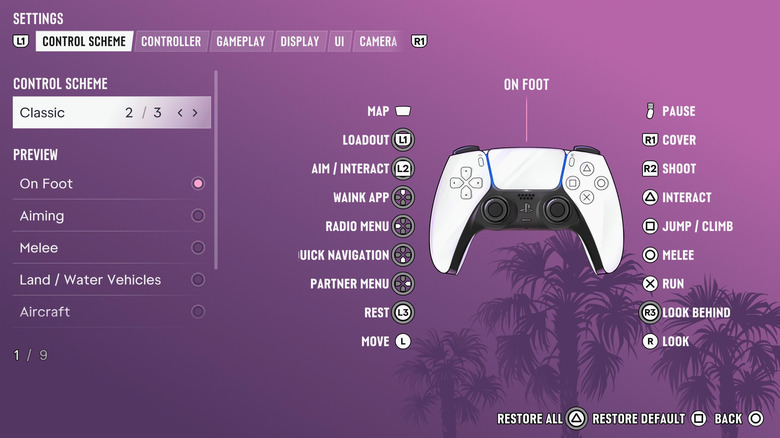
One of the ways in which Rockstar brought GTA 6 into the modern age is by making a key change to the control system. For many years, GTA players may have had to give their thumb a bit of a workout when they wanted to sprint. By default, the console versions of GTA 5 require players to mash the X button on PlayStation or A on Xbox to help them high-tail it to their destination. The settings allow you to change this so you can hold down the button instead, which is an improvement.
However, many found it inconvenient to have this core movement function mapped to a face button instead of a thumbstick. Lots of other game developers have long assigned the sprint function to the left thumbstick, so you just need to click the same thing you're using to move your character to make them speed up.
Rockstar finally got with the program in GTA 6 by assigning the run button to L3 on PS5 and LS on Xbox by default. But maybe you really hate your thumb or for some reason just really liked how the sprint function worked in the previous games.
To return to the old movement control system, hit the pause button and go to the settings. On the control scheme page, you can change the setup from Default to Classic. This assigns run/sprint to X on a PS5 controller and A on Xbox, with the crouch ability moved to L3/LS instead, and jump to Square (PS5) or X (Xbox). In an ideal world, GTA 6 would have fully remappable controls so you could set up the control system however you want. But if you really want that classic GTA feel, you can at least make this change.
How to replicate GTA 5's targeting
One of the main drawbacks of GTA 6 for me after playing the game for 12 hours is that Rockstar hasn't upgraded its shooting mechanics well enough. It's tough to aim accurately — just ask the NPC whose hand I accidentally hit while we were horsing around and doing a whole William Tell thing. The inevitable PC version of the game will at least let players use their mouse for aiming. However, there are aim assist options that can help in the meantime.
For one thing, you can use a similar targeting option to the one found in GTA 5. In the gameplay tab of the GTA 6 settings, scroll down to the combat section and change the Targeting option from Partial to Lock-On. According to the description, this means the game will try to automatically lock onto the closest target when you're aiming. If you enable the Lock-On Target Switch option, you'll be able to flick between nearby targets using the right thumbstick.
This section of the settings menu also allows you to adjust the aim assist strength to your liking. There's also a Shooting Assist option (which helps with tracking targets that are close by) and a way to enable auto-aiming for drive-by shootings. That said, if you're a crackshot with a controller and confident in your accuracy, you can go in the other direction and select the free aim Targeting option.
How to go old school with GTA 6 navigation
Rockstar Games
GTA old heads who have been with the series since the very beginning (hi!) may remember that, in the earliest games, there was no built-in navigation help other than directional arrows that only showed you where to go as the crow flies. You had to navigate the road network all by yourself, relying on your memory, perhaps a printed map and maybe some notes to help you get around. Even getting to the location where you could save your progress in GTA 2 was a pain.
Since then, we've all grown used to minimaps and compasses that help us get to where we want to go. Those are often very useful in open-world games, which have grown in vastly in scope over the last three decades.
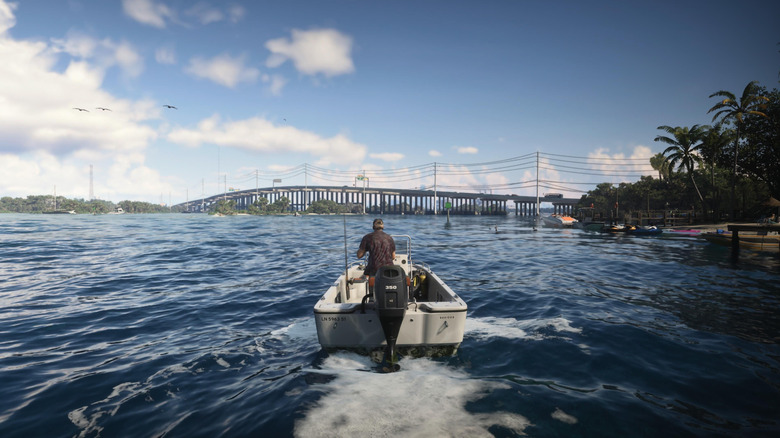
But if you really want a challenge in GTA 6 — and a taste of what things were like in the original 1997 game — you can minimize the navigation help in the latest title. In the UI section of the settings menu, you can switch off the minimap, compass, GPS routes and in-world objective markers and largely rely on your wits.
I recommend that you don't disable all of these features, to be clear. The world of GTA 6 is vast and dense. Getting around and knowing where to go without using any of these tools would be very difficult. But, if you want a true old-school GTA feel or want to make the game as immersive as possible, tinkering with the navigation systems is something you can try. Unlink in GTA 2, though, at least you won't have to zip over to the local church to save your progress.
KioskNews shows a cleaned-up reading view extracted from the publisher’s page — the original always lives on their site, not ours.