How to use Spotify's Running Mode on iOS and Android
Maximize your stride with the streaming service’s AI-powered feature.
Spotify
Spotify launched its dedicated Fitness hub earlier this year, another move that shows how streaming service is looking to go beyond music and podcasts. Now, with the addition of Running Mode, it's more obvious than ever.
The new AI-powered feature is now available on both iOS and Android, exclusively for Premium subscribers in select markets, delivering a custom experience that tailors playlists to your fitness goals. Each Running Mode playlist is built around the music's BPM to align with the type of run you select.
Unlike Spotify Running, which was sunsetted in 2018, it doesn't play songs based on pace detection; now, it mainly lets you choose what to listen to. Instead of forcing you to skip tracks mid-workout or keep running back that same old playlist you've had for years, the new mode lets you dictate everything with added customization through the Prompted Playlist feature, structured intensity curves and voice guidance.
Whether you're lacing up for a low-key jog, a high-cadence speed workout or an interval run, setting up Running Mode on Spotify to find your ideal running soundtrack only takes a few quick steps.
How to activate Running Mode
Spotify
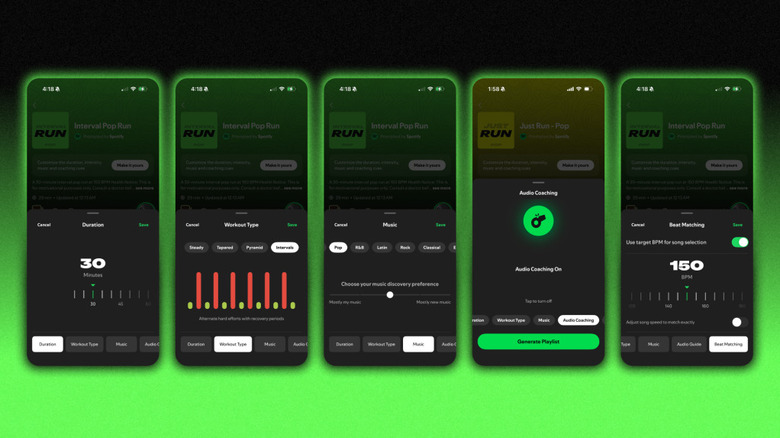
Tap into Spotify on your iOS or Android device, then go to the Fitness hub, where you'll find Running Mode. There, you'll find a variety of genres and pre-structured workout types to choose from, including Intervals, Pyramids, Easy and Long, and Advanced.
Intervals will automatically swap between rapid stretches and breaks, using BPM as a designator to help you slow down and speed up as needed. Pyramid runs will start with a Warm Up period before leading into Build, Peak, Downshift and Cooldown sections with BPM tailored to each phase.
If you prefer a steady cadence, the Easy workout defaults to a manageable 135 BPM across a quick 20-minute run. On the other end, the Long and Advanced session pushes the tempo to 150 BPM over 45 minutes to keep your preferred rhythm locked in for the long haul. No matter which you choose, Spotify lets you adjust the length from 10 to 90 minutes.
For added personalization, the Beat Matching feature lets you set the pace. According to Spotify, most users prefer to stay around the standard 160 BPM mark, but many runners prefer to up the ante. If you want a rapid-fire tempo, you can dial it up to 170–180 BPM.
In case you don't want to fiddle with your phone before dashing out the door, Spotify accounts for that, too. Select one of the 20-minute sessions called 'Just Run,' so you can get a move on without having to scroll through the plethora of presets.
What can you listen to?

Organic Media/Getty Images
All four workout options are accompanied by genre-specific playlists. Whether you're feeling pop, hip-hop, EDM, country or rock, you can easily decide what songs serve as your workout's soundtrack. Each Running Mode playlist updates daily, but Spotify lets you save the ones you enjoy the most so you can revisit them for future runs.
For runners who want more control over what they're listening to, the "Prompted Playlist" feature is a game-changer, offering unique customization without too much effort. Tap "View prompt" and type in your request to DJ the session as you see fit; you can go broad with prompts like "high-energy songs that I haven't listened to since last year" or get specific with "hip-hop tracks from 2013 that make sense for a Sunday morning jog through the suburbs," and Spotify will add songs that fit the mood.
Tunes aside, if you need more of a push, you can also activate optional audio cues for mid-workout pep talks and motivational check-ins along the way, or simply mute them when your favorite songs are enough motivation.
KioskNews shows a cleaned-up reading view extracted from the publisher’s page — the original always lives on their site, not ours.