Apple's new iPhone and iPad security feature can protect you from scammers

Apple wants you to stop falling for scammers, and this feature adds more safeguards.

bluestork/Shutterstock
Apple has delivered a great new security feature with iOS 27 and iPadOS 27, though it's not one that made headlines. Called Impersonation Risk Detection, it analyzes device behavior in real-time to flag active social engineering scams — the kind that trick you into handing over access yourself, even when your passwords and two-factor codes are working as intended.
It runs entirely on-device, so Apple never sees your photos, texts or any other personal content. When a supported app requests a risk assessment, it receives a label with none of the underlying data behind that determination. This is an opt-in feature, making it a complementary tool to all the other steps you take to be safe online.
Security features like two-factor authentication are great, but Impersonation Risk Detection is built for a different kind of danger. Social engineering scams don't force their way through your defenses, but rather convince you to open the door yourself. From old-school callers posing as your bank to texts that look like a fraud alert, they all create a sense of urgency that tries to short-circuit your protections. When you're opening the door yourself, no two-factor code can flag the problem. But this feature (hopefully) can.
Understanding Impersonation Risk Detection
Suitably Studio/Shutterstock
Impersonation Risk Detection works to detect the signs of a scam as it's happening. When you take a sensitive action, such as making a payment or changing account security details, a supporting app can request a real-time risk assessment. Your phone generates that assessment by analyzing interaction patterns, timing, context and basic sensor data, which all runs on-device. Based on this analysis, the system assigns one of three risk levels:
-
Unknown: The system didn't detect any suspicious activity (although this doesn't mean it's safe to go ahead).
-
Medium: The tool detected some signs of suspicious activity.
-
High: Major signs of suspicious activity were detected.
An attacker posing as a bank representative or government official can pressure people into approving shady transactions or sending their passwords, which can be even more convincing with AI. Apple's new tool fills a gap by catching suspicious behavior during the moments scammers rely on. However, the decision on what to do next belongs to the app developer. Depending on the risk level returned, the app might ask you to verify your identity, impose a short waiting period or display a warning.
How to enable Impersonation Risk Detection
Apple
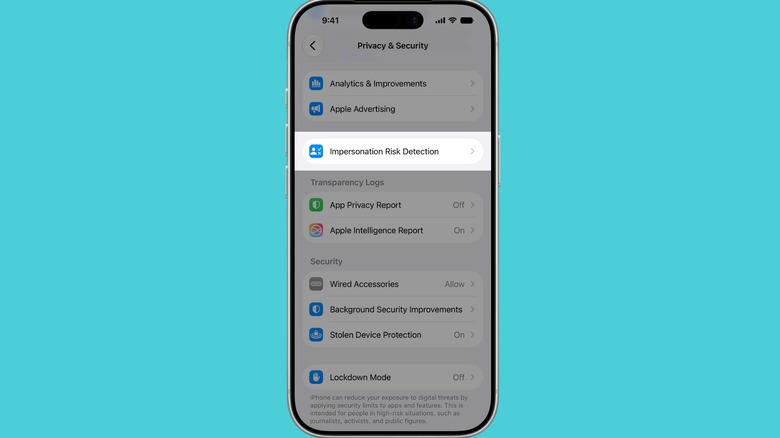
If you want to enable this function for yourself or loved ones, follow these steps on your iPhone or iPad:
-
Go to Settings > Privacy & Security.
-
Scroll down to Impersonation Risk Detection and toggle on Share with App Developers.
On the same menu as above, you'll be able to see which apps have requested a risk assessment and why, and adjust their access. Apple also mentions that if someone contacts you and insists you turn this feature off, you should treat it as a red flag. For exactly this reason, toggling the feature off can take up to 24 hours to take effect.
This feature only works with apps that are built to support it, and Apple hasn't published a list of them yet. Hopefully, many will incorporate this this over time. Impersonation Risk Detection is a logical extension of the Apple's privacy-first security focus, as seen in Safari's anti-tracking tools. It addresses a blind spot that no browser setting or password manager can fully solve: manipulation.
KioskNews shows a cleaned-up reading view extracted from the publisher’s page — the original always lives on their site, not ours.