Apple rolls out iOS 27: 10 ways it will 'change' your iPhone
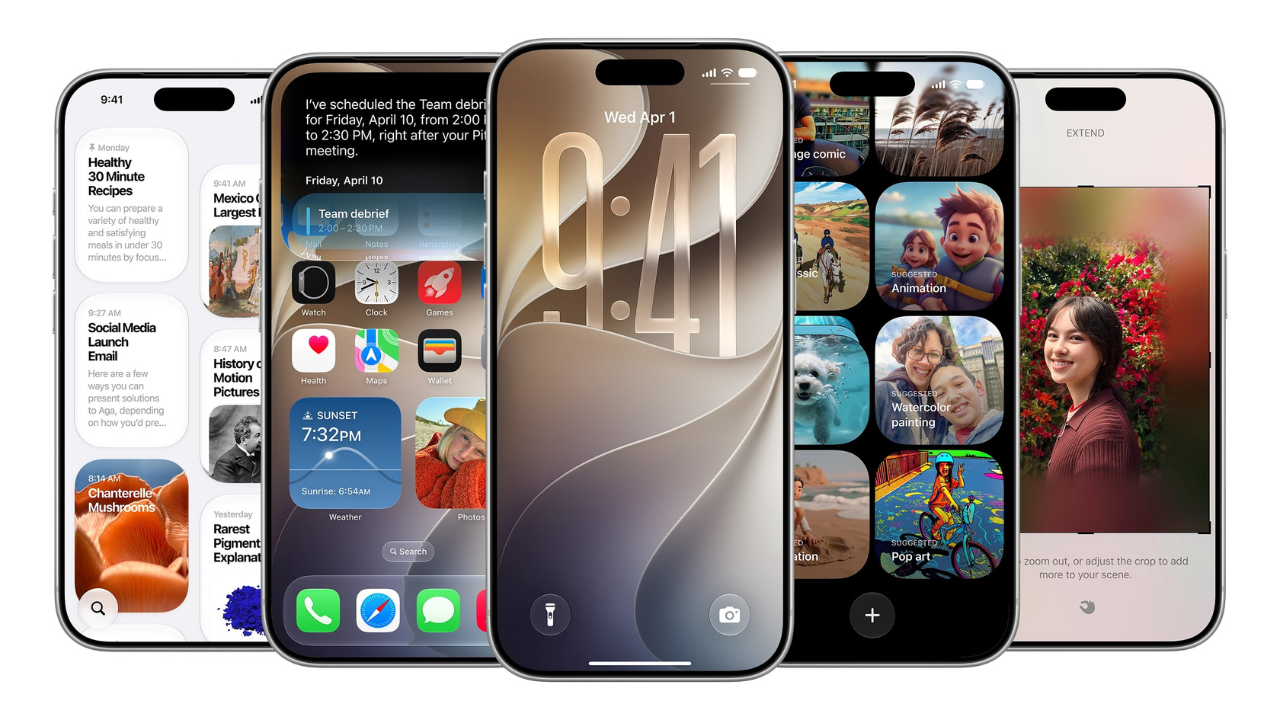
Apple's iOS 27 is out for iPhone 11 and newer, with Siri AI as the headline change.
Apple has released iOS 27, the largest iPhone software update it has shipped all year, and it is free for every iPhone 11 and newer. The rollout started on Monday and the update is live in India now.
The headline is Siri AI, a rebuilt assistant that holds a proper back and forth, reads what is on your screen, and searches your own mail, messages and photos before it answers. Underneath that sit a Camera app that can read a restaurant bill, a Shortcuts app you can talk into shape, a Photos editor that pushes a picture past its own borders, and a slider for everyone who spent the last year quietly resenting Liquid Glass.Siri AI is also the feature Apple has owed its users since 2024. The personalised, context aware assistant it demonstrated that year never shipped on schedule, and the gap was long enough that a fair number of iPhone owners stopped waiting and installed a chatbot instead. What arrives today is that promise, delivered late and still carrying a beta label, with English first and French, Japanese, Korean, Portuguese and Spanish following in October.
Apple has hedged the rest of the release accordingly. A great deal of engineering in iOS 27 has gone into things that have nothing to do with AI, from app launch times to how the phone hands over between Wi-Fi and cellular, which is the part of this update that will reach the most people.
iOS 27 compatible iPhones: the list stretches back to 2019
iOS 27 installs on:
- iPhone 11, 11 Pro and 11 Pro Max
- The complete iPhone 12, 13, 14, 15, 16 and 17 lines, including the 16e and 17e
- iPhone Air, iPhone 18 Pro, iPhone 18 Pro Max and iPhone Duo
- iPhone SE, second generation onward
Apple Intelligence and Siri AI need a shorter list: iPhone 15 Pro, 15 Pro Max, every iPhone 16 model and later, the iPhone Air and the iPhone Duo.
A handful of features sit on an even narrower shelf. Tuning how Siri sounds, down to pitch and pace, is restricted to the iPhone 18 Pro, 18 Pro Max, Duo, 17 Pro, 17 Pro Max and Air.
How to update to iOS 27
- Back up first through Settings, your name, iCloud Backup, Back Up Now. Use a computer instead if your iCloud storage has run out.
- Open Settings, General, Software Update. Swipe down on the page if iOS 27 is not showing yet.
- Select iOS 27 and follow the prompts. A number of users have watched the installer describe itself as 26.7 before the phone reboots onto iOS 27.
- Switch Siri AI on afterwards in Settings. It stays off until you ask for it, and it is not available to anyone under 13.
Siri AI knows what is in your inbox, and answers from it
The new assistant works like a chatbot with one thing no rival has, which is private access to what is already on the phone. When you install the update it indexes your calendar invites, mail, texts, files and notes, then answers from that. Ask for a recent photo of your dog and it surfaces several. Ask which weekend you were in Goa and it knows, because your boarding passes told it. The working list includes:
- Finding a mail, message, photo, link or file by person, date or place
- Building a home automation from an instruction such as locking every door at midnight
- Adding a birthday or a second number to a contact without opening the app
- Lifting every ingredient off a recipe page into a shopping list
- Answering questions about whatever is on screen, and searching the web when it has to
Say the wake word and a shimmering orb appears in the Dynamic Island with a card you can pull down into a full Siri app, which keeps your conversations and continues them on an iPad.
It now asks which part of a request it did not follow rather than failing silently. It is still slower to respond than Gemini, and it fumbles retrievals a well indexed inbox should make easy.
Point the camera at a restaurant bill and Siri splits it
Swipe past Photo and Video in the Camera app and a Siri tab appears. Hold it over a nutrition label and the numbers go into Health. Hold it over a shopfront and ask for the hours. Hold it over an event schedule and each entry lands in your calendar.
The demo everyone will run is the receipt split, which reads the bill, works out each person's share with tax and tip, and settles the total through Apple Cash. Printed receipts scan reliably.
Handwriting is a gamble. The Apple Cash requirement also means this is a feature Indian users can admire and not use.
Write with Siri copies your tone before it writes a word
Siri can draft inside any text field, rewrite what you have typed, shift the register, or tell you where a draft is weak.
In Messages and Mail it reads your existing writing and imitates your phrasing and punctuation, which is the difference between a useful draft and one you delete. Grammar suggestions now appear alongside spelling corrections across the system.
Older iPhones feel quicker, and Liquid Glass gets a dial
Apple's own testing puts app launches up to 30 per cent faster, newly shot photos loading up to 70 per cent faster in the library, and AirDrop transfers up to 80 per cent faster.
Treat the figures as the company's, but the change registers within minutes, and it lands on every supported handset instead of only the Apple Intelligence tier. Messages retries a failed send by itself now, and the switch between Wi-Fi and cellular is less jarring.
For the look of the thing, Settings, Appearance, Liquid Glass opens a slider that runs from ultra clear to fully tinted.
Shortcuts builds the automation from one sentence
Shortcuts has always been capable and almost nobody used it, because building anything meant stacking actions by hand and guessing at the logic.
Now you tap the plus sign, write what you want, and the app assembles it. Message a family member your ETA when you leave the office, or trigger a playlist when CarPlay connects. You can refine the result in plain language or edit the steps yourself.
Photos can extend a shot past the edges of the frame
Clean Up has been the softest of Apple's editing tools since it launched, mostly because it left warped patches behind. It now runs in three modes: Fast, on device, for small removals, High Quality, which goes to Apple's servers, and Auto.
Beside it are Extend, which invents what lies past the original frame, and Spatial Reframing, which shifts the apparent camera position after the picture was taken. Image Playground handles photorealistic output now, and Apple has said SynthID watermarking support is coming later this year.
Safari watches a product page and tells you when the price falls
Notify Me is the smartest small idea in this release. Find the listing in Safari, open the Tab bar menu, tap Notify Me, describe the change you are waiting for and set how often the browser should check.
It watches the page for a restock or a price cut and alerts you. Safari also sorts open tabs into topics on its own, and will write a custom extension from a plain description, from a citation generator to forcing a minimum font size on a site with unreadable type.
AirPods finally get a custom EQ, alarms get their own volume
You can tune the lows, mids and highs on AirPods yourself rather than accepting Apple's preset, through AirPods settings, Audio and Routing, Equaliser, Custom.
It works on AirPods 4 and 5, AirPods Pro 2 and 3, and AirPods Max 2. Separately, Settings, Sounds and Haptics lets you unlink alarm volume from ringer volume, which fixes the old problem of sleeping through an alarm or being startled by a notification at maximum volume.
GymKit also arrives on iPhone, and AirPods Pro 3 can pass heart rate data into a workout.
A child now has to ask before opening a new website
The parental controls are the most substantial non AI work in this release, and they are built around approval rather than blocking:
- Ask to Buy holds every app install until a parent says yes
- Ask to Browse does the same for new websites in Safari, with the request arriving in the parent's Messages
- Communication Safety, which already caught nudity, now intervenes on gore and violence in shared images and video
- Time Allowances cap daily use across Entertainment, Games and Social Media, with age guidance Apple developed with clinical and child development specialists, while Schedules decide which apps work at which hours
Screen Time itself has been redesigned around an at a glance view of what a child actually used.
One phone number across two iPhones, for a monthly fee
Two iPhones running iOS 27 can share a single number, with the line following whichever handset you unlock. It is set up in Settings, Cellular, This iPhone and Another. The obstacle is the carrier. Only T-Mobile supports it at launch, at roughly Rs 440 a month, with Verizon expected later this year and no Indian operator involved yet.
The smaller iOS 27 changes are the ones you will stumble into
Some of the best work in this update never made a slide. These are the fixes that remove a daily irritation rather than add a headline, and most of them land on older iPhones too.
- Save a single frame from a video as a photo, instead of screenshotting and cropping it. Anyone who shoots video of moving children or pets has wanted this for years.
- A Captured By Me filter in Photos separates pictures you actually took from the flood of forwards in your library, reaching back across older iPhones.
- Wallet builds a pass from a photograph of a physical card, so a library card or a gift voucher stops living in a drawer. There is a manual template route if your iPhone does not support Apple Intelligence.
- Home screen widgets stretch to an extra large size, which makes Notes, Calendar and Weather worth reading rather than tapping through. Weather now shows nine days instead of five.
- Choose which eight controls sit above the Camera viewfinder. Lens Aperture and Shutter Speed are reserved for the iPhone 18 Pro and 18 Pro Max.
- Messages stops holding up your next text while a large photo crawls out over weak cellular.
The bigger leftovers come with conditions attached. Call Context surfaces a confirmation code or a booking reference from your mail while you are on a call to a business. HomeKit Secure Video cameras record and stream in 4K, and the Home app can describe what happened in a clip or search footage in plain language, although those AI pieces need a 2TB iCloud+ plan for a single camera and more beyond that. Maps Flyover renders architectural detail and individual trees from aerial imagery.
Cycle Tracking in Health adds perimenopause support, with deviation notifications aimed at users over 40. iCloud Shared Albums allow full resolution sharing at last, and are easier to join from Android or Windows. VoiceOver and Magnifier both pick up substantial accessibility work.One to wait for rather than look for: the Passwords app will update weak or compromised logins on your behalf, but Apple has marked that as coming in a future release rather than shipping it today.
KioskNews shows a cleaned-up reading view extracted from the publisher’s page — the original always lives on their site, not ours.