If your laptop trackpad is popping out, stop using it immediately

A swollen battery can ruin your laptop and even cause a fire.

Oatawa/Getty Images
Trackpads on modern laptops are usually flat. But maybe you've noticed that yours has started to come loose, as if something were pushing it from the inside. It might even get to the point where the glass covering it cracks. If this happens to your laptop, you could have a serious trouble on your hands. The battery may be to blame, and you should stop using your laptop immediately. But don't throw your laptop away just yet — there are ways to fix it so you can use it safely again.
A loose trackpad could mean your battery is about to explode
brizmaker/Shutterstock
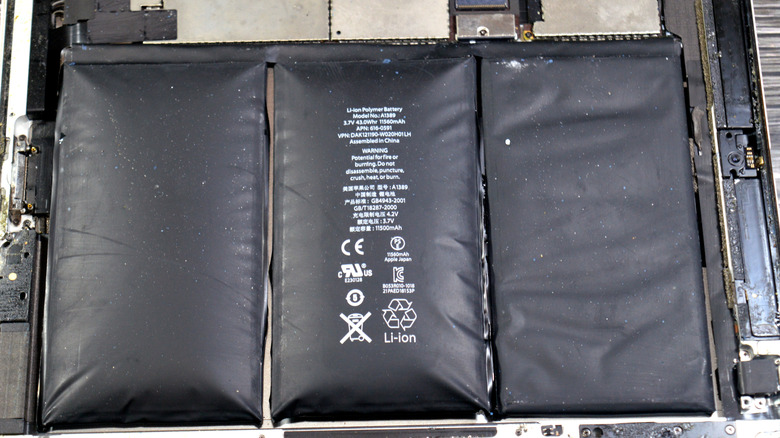
To understand why, you should start by learning how batteries work. Pretty much every modern laptop has lithium-ion batteries inside. They're responsible for providing power when the laptop is unplugged. Overall, these batteries are quite safe if used properly. But they can put you at serious risk if you ignore certain safety precautions. A battery relies on many chemical reactions to work. And when it's overcharged or physically damaged, the internal chemical components can produce harmful gases.
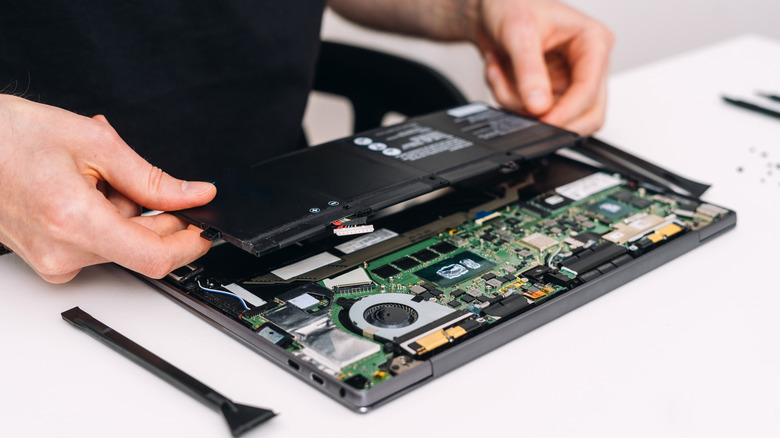
The result is disastrous for your laptop. The battery starts to swell and pushes against all the components around it. And when it comes to laptops, the battery is usually located underneath the trackpad. Surface laptops and MacBooks are no exception. And you can imagine where that leads. A swollen battery pushes the trackpad out. A trackpad that pops out is usually a sign that your battery is nearing the end of its life. And that's not hypothetical — Apple already had to launch replacement programs for MacBooks with swollen batteries.
Your laptop stopping working wouldn't even be the worst-case scenario. A faulty battery can swell to the point where it explodes. The risk of it bursting into flames is very real. Sure, there are situations in which a trackpad might come loose due to other hardware malfunctions. Perhaps an internal screw has come loose, or your laptop has suffered an impact. But it's still worth taking every precaution to make sure it's not a battery issue.
Repairing and preventing accidents with swollen batteries
Tamer A Soliman/Shutterstock
Have you noticed anything unusual with your laptop's trackpad? Is it popping up, or does the laptop case seem to be bulging? If the answer is yes, stop using your laptop immediately. Turn it off and unplug it. For most people, the best advice is to take your laptop to a repair shop. Dealing with swollen batteries can be very dangerous — one wrong move and it could catch fire. Having a professional take care of your laptop is probably the right choice here.
The good news is that laptops in this situation can be easily replaced in most cases. The trackpad snaps back into place once the new battery is installed. Prices for repairs like this can vary. Apple, for example, charges $149 to $249 to replace a MacBook battery — depending on which model you have. The price may be higher if the trackpad was damaged by the swollen battery. Most laptop makers will repair a bad battery for free if the device is still under warranty. It's worth checking to see if yours is still covered.
Also, some habits can help preserve your laptop's battery and keep it from overloading. Avoid leaving your laptop in extreme temperatures or in direct sunlight for long periods of time. Using original, certified chargers is also a good way to prevent accidents. And if you're going to store your laptop without using it for extended periods, keep it at about 50 percent charge. Try to turn it on and check it every three months to make sure everything is fine. Changing some settings on your laptop can also help reduce battery wear.
KioskNews shows a cleaned-up reading view extracted from the publisher’s page — the original always lives on their site, not ours.