What typically uses the most data on a smartphone?


Ipopba/Getty Images
According to Ericsson's mobile traffic data report, the world currently moves around 150-200 exabytes of mobile data monthly. That is 150-200 million terabytes monthly. And that number is only going to keep increasing; Ericsson forecasts that by 2031, global monthly usage will have grown to 328 exabytes, more than double today's figures. The average smartphone alone now consumes more than 20GB a month, up from 4.9GB just a few years ago.
Different people rack up that total in different ways: Some people spend all day doing battle on X, while some find themselves drawn into TikTok's unending videos, so there's no one thing that uses the most data. Although there is no lone culprit, these usually do the most damage: video streaming, social media, video calls, software updates, cloud backups and music streaming. For what it's worth, on most of these you can control how much data they consume through a quality setting or two.
Video streaming and video calls are the biggest drains
Video streaming services, including Netflix, YouTube and Prime Video, among others, consume a significant amount of data, especially if you're watching at the highest resolution. Let's start with the most popular video platform: YouTube. On low resolution (360p), YouTube consumes around 500MB per hour; on 720p, roughly 2GB per hour; on 1080p, it's 3GB per hour; and on 4K UHD, an hour on YouTube can consume over 15GB of data.
Netflix is a bit more considerate with your data. The platform uses 300MB per hour on Low quality settings, 700MB (0.7GB) per hour on Standard definition, around 3GB per hour on HD and up to 7GB of data per hour on Ultra HD (4K). Amazon Prime Video, on the other hand, offers three quality options: Good, Better and Best. Good streams at 480p and uses around 0.72GB per hour; Better streams in HD and uses roughly 1.8GB of data per hour; and finally, Best streams at 4K and consumes nearly 6.8GB per hour.
On the other side of the video spectrum are video calls (and conferences). On average, video calls consume around 500MB per hour, though platforms built for group conferencing like Zoom use much more. A one-on-one Zoom call will consume about 540MB per hour at 480p, 1.08GB per hour at 720p and over 1.62GB per hour at 1080p. Group calls use more data: 810MB per hour at 480p, 1.35GB per hour at 720p and 2.48GB per hour at 1080p, since Zoom has to download a separate audio and video stream for every participant.
Social media data usage depends on how you use it
Tada Images/Shutterstock
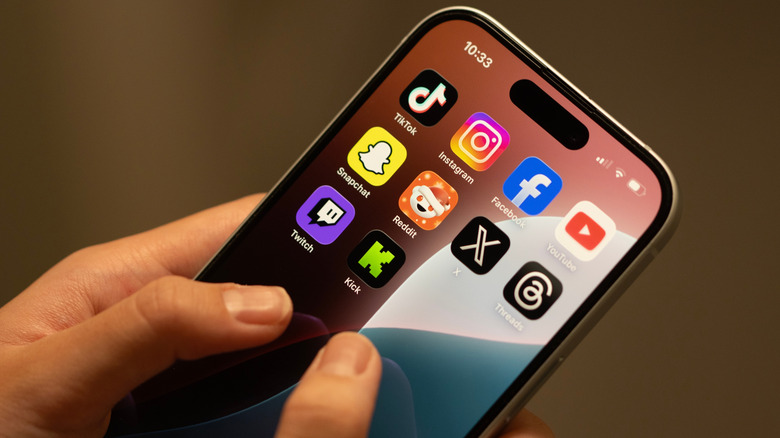
It's not uncommon for a single social media post to include text, images and videos, so how much data it consumes can vary widely depending on the exact platform and the type of posts you're viewing. TikTok is mostly short videos, and depending on the resolution, an hour of scrolling can use around 750MB to 1GB of data. Instagram is a mix of photos and videos unless you're spending more time on Reels. On average, Instagram (Reels included) can use up to 1.5GB of data per hour. Text and image posts still dominate Facebook, so it uses a conservative 500MB per hour. That figure can stretch up to 1GB per hour if you start watching more videos. Text-focused social media platforms like X (formerly Twitter) and LinkedIn use far less data than their video-heavy counterparts. X uses as little as 50MB to 1GB of data per hour, and LinkedIn consumes around 120MB to 240MB per hour. And as usual, these figures can change dramatically if you consume more video content on either platform.
Updates, cloud backups and music streaming add up too

Tsingha25/Getty Images
Software updates are another major but low-key guzzler of data, largely because most updates and backups happen in the background. A single iOS update can run anywhere from a few hundred megabytes to more than 12GB if it's a major release. Android updates follow the same pattern, but the exact size varies depending on the device and the manufacturer. Cloud backups add to that total, but how much data is consumed depends on what exactly is being backed up.
Music streaming uses relatively little data. At its highest quality settings, a single song on Spotify streams at 320kbps, which translates into 144MB per hour. On default quality settings, an hour of Spotify consumes around 43MB. But that can quickly add up if you stream music for long hours or you're listening in Apple Music's lossless audio quality, which uses roughly 720MB per hour, or as much as 2.9GB per hour at Hi-Res Lossless. Across nearly every category covered, you can cut down data usage by simply downloading content over Wi-Fi for offline playback later on. Once something is downloaded, it won't use your data plan again.
KioskNews shows a cleaned-up reading view extracted from the publisher’s page — the original always lives on their site, not ours.